Labels on sailcloth rolls disappear.Your data and inventory shouldn’t.
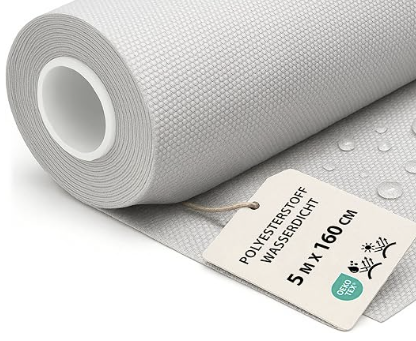
When a paper label falls off, a roll becomes difficult to identify — and nobody knows exactly what cloth it is or how much is left.
THE SOLUTION IS HERE — AND IT’S FREE
Sailventory gives every roll a permanent wireless identity. Photograph the mill label, write the details to a wireless tag, then tap the roll anytime to see what it is and how much is left. Each scan also updates the stock overview on your phone.
The Sailventory app is free. No account, no server, no subscription. Android and iPhone.
YOUR CLOTH. ONE TAP AWAY.
How it works
Four steps, and the roll is tagged.
A sail loft does not need a stock system. It needs to walk up to a roll and know what it is. Everything here is built around that one moment.
Photograph the label
Point the phone at the mill label. The app reads the mill, article, shade, grade, lot number, width and length.
Confirm what it read
Anything the app is unsure of is flagged for you to check. Values it found but could not place are listed at the bottom — tap one, then tap the field it belongs in. Need more than one entry in a field? Press +. Nothing reaches a chip unconfirmed.
Write the chip
Hold the phone against a tag stuck to the roll. The record is written, then read back and compared before it says done.
Cut, and tap again
Enter what you cut and the metres left on the chip go down. Tap the roll any time to see where it stands.
Mill labels are laminated and they reflect. The glare moves as the phone moves, so the app takes three frames a fraction of a second apart and merges them — frames that agree raise its confidence, frames that disagree get flagged for you. It is the difference between reading a label and guessing at one.
And it learns. The reader trains itself on the labels you scan — a label it has never seen reads poorly at first, and better every time after. Every value you place by hand teaches it where that value belongs.
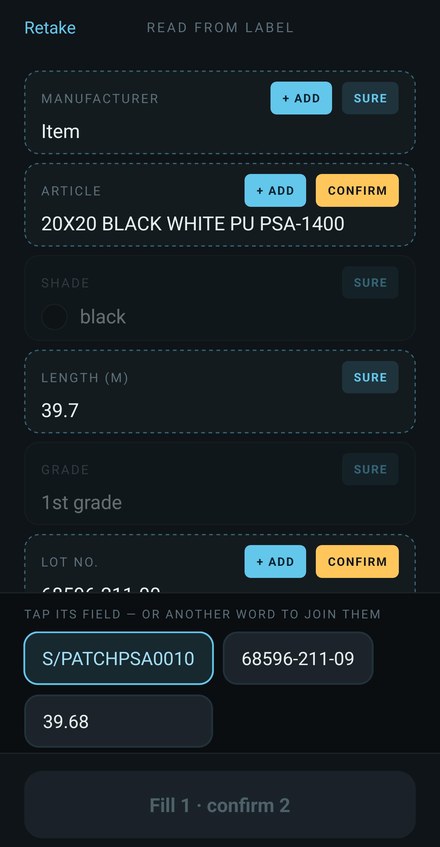
Confirm screen
Nothing is lost. Place it, join it or add it.
Not identified? Pick it from the tray.
Values the reader found but could not place wait in a tray at the bottom of the screen. Tap one, then tap the field it belongs in — it moves up, and the reader remembers where that value goes next time.
Join words that belong together
A label sometimes splits one value over two lines. Tap one word in the tray, then tap another, and they are joined into one.
Add to the name
Press + Add on a field to put more into it — an extra word or code on the article name, for example. The field keeps what it had and takes the new entry too.
Sure or confirm
Fields the reader is sure of are marked Sure. Fields it doubts turn amber and say Confirm. The button at the bottom counts what is left, so a roll is never written half-checked.
Your loft, at a glance
Read a tag. Your stock count updates automatically.
Every time you read or write a tag, the roll is automatically registered in the stock count on your phone — or on every phone in the loft. You immediately see which cloth you have and how much is left — all in one place.
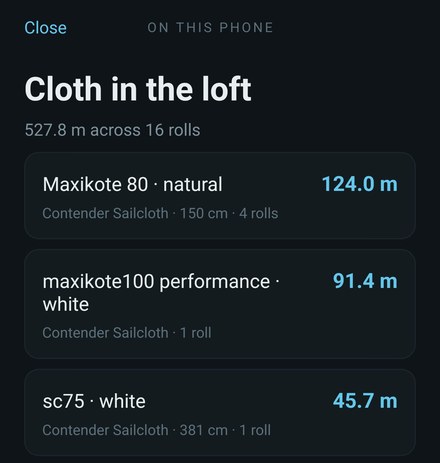
Automatic stock count on your phone
Sailventory adds every scanned roll to one stock list and totals the remaining amount for each cloth. Scan your tags and your phone builds the inventory for you — no manual stocktaking or separate spreadsheet needed.
Export the complete list to your PC
Export the complete inventory as a CSV file and send it directly to your PC. Open it in Excel or another spreadsheet to plan purchases, share the stock overview with your team or continue working with the figures.
Several phones, one stock list
Every phone in the loft can hold the same roll list. They stay in step through a shared folder on a computer or server on the loft’s own network — set up once in the app. Nothing goes to the cloud.
The inventory is stored locally on the phone, and in your own shared folder if you use more than one phone. Tap a roll again to read its latest remaining length from the tag, then export the updated overview whenever you need it.
What you get
The chip carries the roll. The phone keeps the loft.
Everything on the roll
Mill, article, shade, grade, lot number, width, original length and what is left — written to the chip itself, so it travels with the cloth rather than with a phone, an account or a spreadsheet.
Cloth in the loft
Every chip you read or write is remembered and totalled per cloth, with what is running low turning amber and then red. Two rolls off one batch count as two rolls.
Cuts, not paperwork
Enter the metres you cut. That is the whole interaction — no job numbers, no sail numbers, no cut history to maintain. The loft needs to know what is left right now.
A way out
Export the list as CSV through the share sheet whenever you want it somewhere else. Semicolons and comma decimals by default, so it lands in columns in a Danish Excel rather than all in column A.
Metric or US units
Choose in settings. Lengths, widths and cuts are shown and entered in the unit the loft works in. Always stored on the chip in metric, so a tag written in one loft reads correctly in another.
Wireless tags
Where to get tags — and what to look for.
Wireless tags are inexpensive and widely available. The most important detail is their physical size: a larger antenna usually gives you a better reading range and makes the tag easier to use on a busy loft floor.
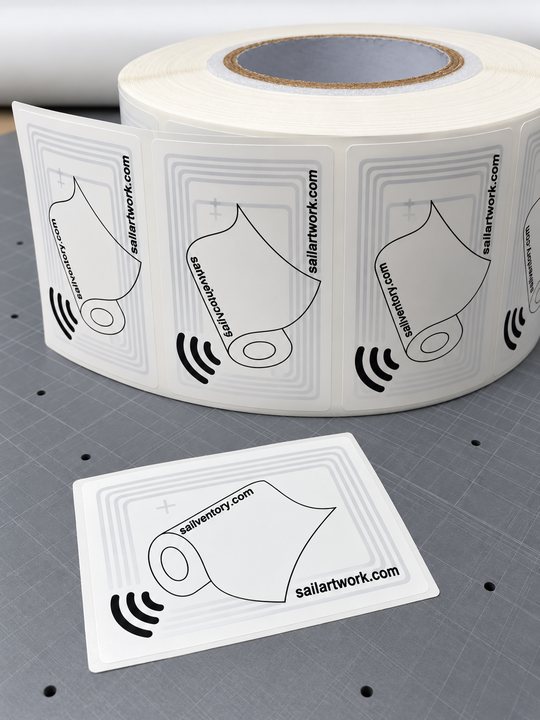
Ready for sailcloth rolls
Sailprint.eu supplies extra-large tags selected for reliable reading on sailcloth rolls, priced at approximately US$0.50 each. Any NTAG213, 215 or 216 tag works just as well.
Extra-large · better reading range · about US$0.50 each
Buying tags elsewhere
You can buy compatible tags almost anywhere. Look for self-adhesive NTAG213, NTAG215 or NTAG216 NFC tags and choose a reasonably large physical size. Very small tags have smaller antennas and a limited reading range, so they can require more precise phone placement.
NTAG213, NTAG215 or NTAG216 · self-adhesive · choose a larger size
What else you need.
Wireless tags
A wireless sticker holds the details of your roll. Hold your phone close to read or update it. Once written, the tag needs no power, battery or internet connection.
NTAG213, NTAG215 or NTAG216 · self-adhesive · no battery
Android
An Android phone with NFC, the short-range wireless feature used to read tags. The camera reads the label, and the phone writes the chip, and holding the phone to a tagged roll opens the app on that roll even when it was closed.
Android 7 or newer · NFC tag reader · camera
iPhone
The same app, reading and writing the same tags. An iPhone 7 or newer on iOS 13 or later can write a wireless tag as well as read one; tapping a roll to open the app from the lock screen wants an iPhone XS or newer.
iPhone 7 or newer · iOS 13+
Stick a tag on the roll's core or end cap, somewhere a phone can reach without moving the cloth. Once written it needs no power, no signal and no app to keep existing — the record is physically on the chip. Tags are ordinary NDEF, not a private format, so nothing about a tagged roll is tied to the phone that wrote it.
No server
100% private. Just a tool for you.
The Sailventory app is 100% private. There is no account, no cloud sync and no server storing your stock. Your roll information stays on the wireless tags, on your phones and, if you share the list, in a folder on your own network — a practical tool made for you and your loft.
- server
- accounts
- hosted data
- analytics
- crash reporting
- ad SDK
- consent dialog
- subscription
The app is free and carries one small advertisement, always marked as one. It uses no advertising network and collects nothing about you, which is why it asks for no consent and needs no privacy policy.
None of that is an accident. The reasoning — why the record is 77 bytes, why the flash stays off, what was deliberately left out — is written up in how it was built.
Questions
The things people ask.
What if the label will not read?
Move so the glare is off the print and try again — the app takes several frames, but it cannot read through a reflection sitting on the words. Every field can also be typed in by hand, so a torn or missing label never blocks you.
What happens if a tag gets damaged?
Stick a new one on and write the roll again. The record is small and takes seconds. Rolls you have already tagged also appear in the stock list on the phone, so the details are not lost with the sticker.
Can two people use it on the same rolls?
Yes. The chip is the source of truth, so anyone who taps a roll sees what the last person left. Point every phone at a shared folder on the loft’s own network and they all hold the same stock list — no cloud, no account.
Does it need signal in the loft?
No. Reading a label, writing a chip and entering a cut all work with the phone in flight mode. Nothing waits on a network.
Why does the same lot number appear on two rolls?
Because it names the batch the cloth came from, not the roll. Buy two rolls of the same cloth at once and both carry it. The app tells rolls apart by the chip's own factory serial number instead.
Does it work on iPhone?
Yes — the same app doing the same job. You need an iPhone 7 or newer on iOS 13 or later, to write a wireless tag as well as read one. Opening the app by tapping a roll from the lock screen wants an iPhone XS or newer.
Can a loft mix Android and iPhone?
Yes. The chip is the source of truth and the record on it is ordinary NDEF, written the same way by both, so it makes no difference which phone tagged a roll or which one reads it afterwards.
Which mills does it recognise?
Currently supported: Contender Sailcloth (Contender), Dimension-Polyant (Dimension DP), Challenge Sailcloth (Challenge), Bainbridge, Mazu, TriLam, Ho Yu, IYU, Airwill, Kao Ren and Teijin.
How do I clear a tag?
Erase a tag from the home screen, then hold the phone to the chip. It is wiped and can be written again for another roll. The roll leaves your stock list with it.